Every Pight Block Type and Color
A textless game still has a vocabulary—learn it once and every level reads faster.
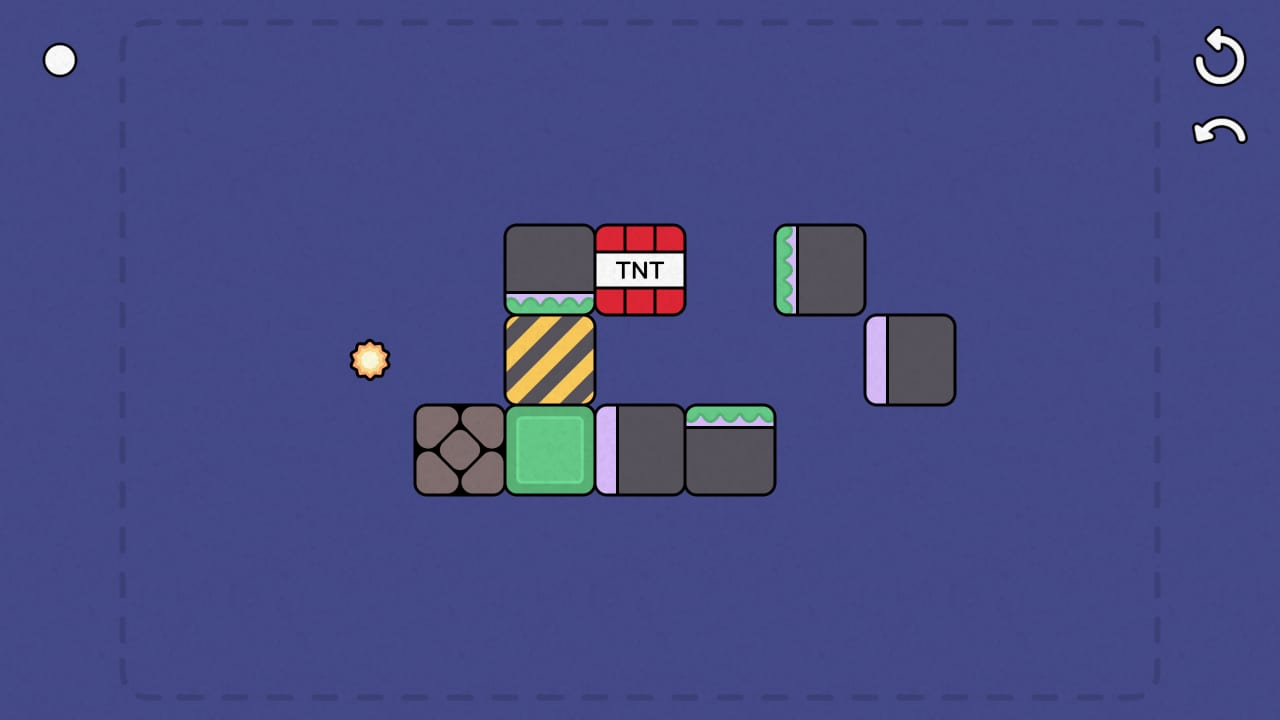
Pight communicates entirely through shapes, colors, and motion. There is no tutorial text, so recognizing block types is the closest thing to reading the rulebook. This guide walks through every major category on the grid: what it looks like, what it does, and how it interacts with pistons, portals, dynamite, and the light block goal.
If you want a difficulty ranking instead of a field guide, start with the mechanics tier list. If you are brand new, pair this page with Getting Started before level ten.
Standard movable blocks
Most colored cubes on the board are standard movable blocks. Pistons push or pull them one tile at a time unless another rule overrides movement. Colors often encode puzzle logic rather than hidden stats: a level may require you to separate red and blue pieces, or to keep a specific color on a power tile.
Standard blocks are the clay of Pight. Stickies attach to them, portals teleport them, and dynamite destroys them. They never conduct electricity unless the level paints them as part of a powered chain—watch for subtle glow or connector marks on the tile beneath the block.
Interaction summary: Pistons move them freely. Hard blocks block their path. Stickies merge on contact. Dynamite removes them from play.
Piston blocks
Piston blocks are interactive tools, not cargo. Clicking them extends or retracts an arm that affects neighbors along the facing direction. Some levels use pistons as one-shot switches; others require you to pulse the same piston multiple times across a long solution.
Orientation matters. A piston pushing upward cannot help a block that needs to move left. When multiple pistons sit in one puzzle, sketch push order before touching anything—see the puzzle planning checklist for a lightweight workflow.
Late-game puzzles treat pistons as logic gates: extend to complete a circuit, retract to break it, extend again to let a sticky cluster pass. That is where Pight stops feeling like Sokoban and starts feeling like redstone.
Sticky blocks
Sticky blocks bond when they touch another sticky or a standard block configured to cling. The merged cluster moves as one unit until something splits it—usually impossible without undo. Stickies are visually distinct from standard cubes; once you see the texture, you will not confuse them.
Sticky chains magnify mistakes. Pushing a cluster into a corner can brick the level until you undo. They also enable elegant solutions: one push moves four blocks into perfect formation around a portal or power tile.
Achievements Clingy and Soulmates reward playful sticky play. If you are hunting achievements, read the full achievements guide.
Hard blocks
Hard blocks resist movement. Pistons waste an action trying to shift them. Designers use them as anchors, maze walls, and puzzle constraints. The achievement Hard? references them directly.
Do not assume every dark or metallic cube is hard—Pight’s art is minimalist but consistent within a level set. Test with a single piston stroke and undo if unsure. Hard blocks often guard the only path to the light block until dynamite or a portal bypass opens.
Dynamite blocks
Dynamite (TNT) detonates when triggered, clearing tiles in a fixed blast pattern. It is the game’s demolition tool. The blast can remove standard blocks, break sticky clusters apart, and—critically—destroy the light block if you are careless.
Ssssss… Boom! and Cost Effective achievements celebrate explosive solutions. Cost Effective implies doing more with fewer blasts; study blast radius before committing. If a level gives limited dynamite, treat each charge as a resource like moves in a chess puzzle.
Never detonate until you have traced every tile in the blast line, especially the row or column hosting the lamp.
Portal blocks
Portals come in matched pairs. A block entering one portal exits the other with rules about facing and momentum that Pight never writes down—you learn by watching. Portals replaced rails in the demo update; current levels use teleportation instead of track movement.
Portals multiply search space. A block might leave north-facing from the exit while you needed east. Test with undo, or walk through the mechanics tier list portal section before tackling dual-portal levels.
Nether-mind marks portal mastery. Screenshots with glowing rings—like the hero image on this page—usually highlight portal puzzles.
Power tiles and electricity blocks
Electricity flows across designated tiles and through certain blocks when a circuit is complete. Powered paths often lead to the light block or to machinery that must activate before the lamp can glow. Conductive blocks may look like standard cubes with a subtle base highlight.
Electric puzzles punish out-of-order pushes. Completing a circuit too early can lock blocks in wrong positions; completing it too late leaves the lamp dark. Solve from the goal backward. High Voltage is tied to this system—among the rarest achievements on Steam.
The light block and power source
The light block is the win condition. Levels end when it receives power—directly or through a chain you built. It is fragile: dynamite and some piston mistakes can remove it (Oopsie Woopsie achievement). Treat the lamp as both goal and hazard.
Adjacent power sources or completed circuits energize the light. Some stages require indirect activation: push block A onto tile B, which powers piston C, which finally lights the lamp. Read light block goal for chain-reaction templates.
Illuminated unlocks when you succeed the first time the glow appears—most players earn it naturally on level one.
Immovable terrain and empty tiles
Not every grid cell is a block. Walls and void define the playable area. Off the Grid achievements push you to think beyond the obvious rectangle—solutions that use every tile or that route blocks through unexpected corners.
Empty tiles matter for portal exits, blast clearance, and piston extension. A piston cannot push into a wall; plan void space as carefully as occupied cells.
Quick reference by interaction
| Block type | Moved by piston? | Special risk |
|---|---|---|
| Standard | Yes | Blocks paths |
| Piston | Activates on click | Wrong order breaks circuit |
| Sticky | Yes, as cluster | Irreversible merges |
| Hard | No | False assumptions waste moves |
| Dynamite | Sometimes | Destroys light block |
| Portal | Teleports | Exit facing surprises |
| Power tile | N/A | Order-dependent circuits |
| Light block | Sometimes | Level fail if destroyed |
Where to go next
Colors will still surprise you in level seventy—that is by design. Keep this page bookmarked, use undo liberally, and when a new symbol appears, pause before pushing. For release notes that changed how portals and blocks interact, see demo update history. For player reactions to the minimalist art, see demo review.
Frequently Asked Questions
Quick answers to the most common questions.
Do block colors change what a block does?
Most colors mark puzzle logic for that level—separating pieces or marking targets—not hidden stats. Special types like stickies and hard blocks have distinct visuals.
Can the light block be pushed?
Sometimes, depending on the level. Treat it as fragile: dynamite and bad piston timing can destroy it and fail the stage.
What happened to rail blocks?
Mindlabor removed rails in a demo update and standardized on portals for moving blocks across distance. Full-game levels use portals.
How do I tell a hard block from a normal block?
Hard blocks resist the first piston push. Use one test push with undo ready, or compare against the [mechanics tier list](/tier-list/mechanics-tier-list/) hard-block section.
Which block types appear in the demo?
The demo includes early pistons, stickies, dynamite, portals, and more across fifteen levels—enough to preview most types before buying the full game.